
View KPI Review Results
Read KPI Review articles in order
Once KPI results are ready for employees to view, employees can access and review their own KPI evaluation results through the system. The results displayed are the final, verified outcomes of the evaluation.
KPI results can be viewed via the Web Application only. At this time, viewing KPI results through the mobile application is not supported.
How Employees View Their KPI Results
Employees can view their KPI evaluation results by following these steps:
-
Go to the Reviews menu
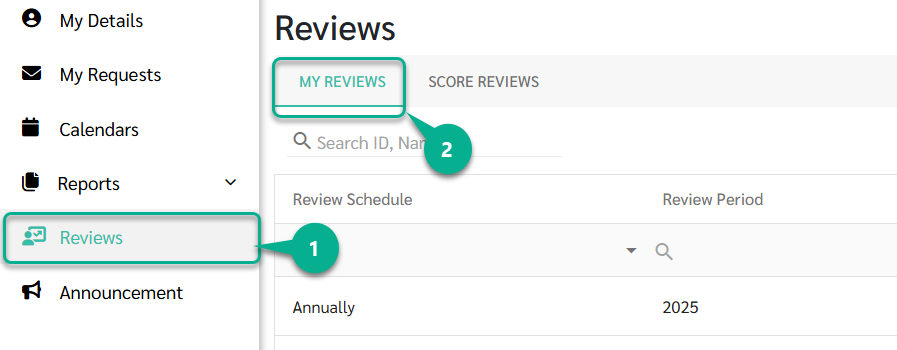
- Click the My Reviews tab
The system will display all KPI review results that have already been announced by the Admin.
Employees can click on the review they want to view to see the evaluation details along with their KPI scores.

Score Calculation
KPI scores are calculated using a two-layer weightage structure to reflect both task importance and reviewer perspective.

1) Reviewer Weightage
- Different types of evaluators (e.g., Manager, Peer, Self) can be assigned different weights.
- The total weight of all reviewers must equal 100%.
- The combined score from all evaluators (100% Reviewer) = The net score for that specific KPI.
2) KPI Weightage
- Each employee can have multiple KPIs, with each KPI assigned its own weight based on its importance.
- The total weight of all KPIs must equal 100%.
- The sum of all individual KPI scores based on their weight (100% KPI Weightage) = The Final Total Score.
3) Total Score Calculation
The final score is calculated using the following formula:
Total Score = (KPI 1 Score × KPI 1 Weightage) + … + (KPI n Score × KPI n Weightage)
Full Breakdown of KPI Score Calculation

Step 1 — Reviewer weighted score (per KPI)
Each KPI score is calculated by combining scores from all assigned reviewers, weighted by their reviewer weightage.
Example KPI 1: Sales target
| Reviewer | Score | Reviewer weightage | Weighted score |
|---|---|---|---|
| Manager | 80 | 70% | 56 |
| Peer | 90 | 30% | 27 |
KPI 1 Score = 56 + 27 = 83
Example KPI 2: Customer satisfaction
| Reviewer | Score | Reviewer weightage | Weighted score |
|---|---|---|---|
| Manager | 85 | 50% | 42.5 |
| Peer | 88 | 25% | 22 |
| Self | 92 | 25% | 23 |
KPI 2 Score = 42.5 + 22 + 23 = 87.5
Step 2 — KPI weighted score
Each KPI score is then multiplied by its KPI weightage.
| KPI | KPI score | KPI weightage | Weighted KPI |
|---|---|---|---|
| KPI 1 | 83 | 60% | 49.8 |
| KPI 2 | 87.5 | 40% | 35 |
Step 3 — Total score
Total Score = (KPI 1 Score × KPI 1 Weightage) + … + (KPI n Score × KPI n Weightage)
Total Score = 49.8 + 35 = 84.8