
KPI Review Overview
Read KPI Review articles in order
The KPI Review system is designed to support employee performance evaluation through Review Rounds defined by the organization.
Within a single review round:
- An employee can have multiple KPIs
- Each KPI has its own weight
- The total KPI weightage must equal 100%
- Reviewer weightage can be configured differently for each reviewer role
- The total reviewer weightage must also equal 100%
The system supports multiple reviewer roles:
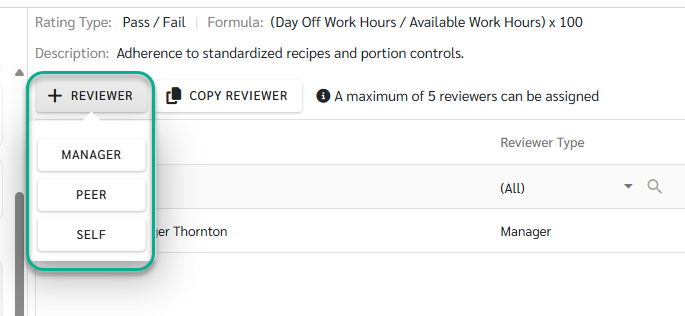
- Manager - Automatically assigned based on the configuration in the employee’s Employee Detail page and acts as the primary reviewer in the KPI Review process
- Peer - selected from employees within the same branch
-
Self - Employees can perform self-evaluation when enabled
KPI & KPI Template
KPI is the core structure of the evaluation process and must be created before it can be used in a KPI Review. All KPIs and KPI Templates are created and managed by Admins, including rating configuration and template setup.
1) KPI
(1) KPI Types
The system supports two types of KPIs, each with a different scoring method.
- User KPI - Scores are entered manually by reviewers during the scoring process.
- System KPI - Scores are calculated automatically by the system using existing system data.

(2) Rating Types
Admins can configure KPI rating formats to match different evaluation needs.
- Percent – Score as a percentage
- Level – Score by level (labels can be customized to match business context)
- Number – Score using a numeric range
- Pass / Fail – Binary scoring (pass or fail)

2) KPI Template
Once an Admin creates KPI Templates in advance, Admins or Managers can select an existing template when creating a review.
The system will automatically apply the KPI set and weightage defined in the selected template.

🚨 Remark
Before starting a KPI Review, Admins must complete the following two required steps:
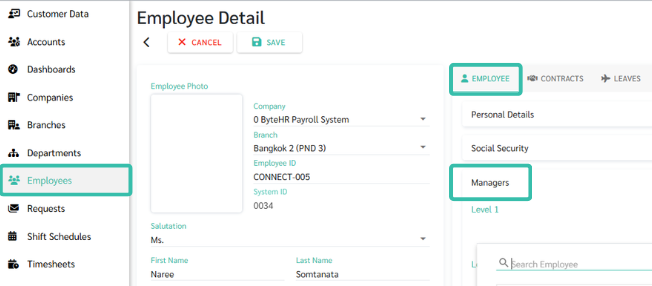
- Assign a Manager for each employee
- Manager assignment cannot be done from the Review page
-
It must be configured in the employee’s Employee Detail page
(Employees → Select Employee → Employee tab → Managers)
-
The assigned Manager will automatically be used as the Manager Reviewer in the KPI Review
- Create KPI and KPI Template
If either step is not completed, the KPI Review cannot be started properly
Review Workflow & KPI Status
1) Create Review (Admin)
Admins create a review by:
- Selecting the review period
- Selecting employees included in the review
The system automatically creates the review in Draft status.
See more: Create Review
2) Status: Draft (Admin & Manager)
Preparation stage:
- Admins and Managers can configure KPIs, reviewers, and weightage
- KPI scoring is not allowed in this status
- Used to review and finalize the evaluation structure before scoring begins
See more: Draft: Edit Review
3) Status: In-Process (Reviewers: Manager, Peer, Self)
When Admins or Managers change the status to In-Process:
- The review enters the scoring phase
- Reviewers can score KPIs and attach supporting evidence
- Admins and Managers can track progress and send reminders to reviewers who have not completed scoring
See more: In-Process: Scoring Review
4) Status: Completed (Admin)
When all scoring is completed:
- Admin changes the review status to Completed
- All results are locked and cannot be edited
- Admin can choose to notify employees immediately or schedule notification for a later time
See more: Completed: Close and Notify Review
Score Calculation
KPI scores are calculated using a two-layer weightage structure to reflect both task importance and reviewer perspective.
See more: View KPI Review Results

1) Reviewer Weightage
- Different types of evaluators (e.g., Manager, Peer, Self) can be assigned different weights.
- The total weight of all reviewers must equal 100%.
- The combined score from all evaluators (100% Reviewer) = The net score for that specific KPI.
2) KPI Weightage
- Each employee can have multiple KPIs, with each KPI assigned its own weight based on its importance.
- The total weight of all KPIs must equal 100%.
- The sum of all individual KPI scores based on their weight (100% KPI Weightage) = The Final Total Score.
3) Total Score Calculation
The final score is calculated using the following formula:
Total Score = (KPI 1 Score × KPI 1 Weightage) + … + (KPI n Score × KPI n Weightage)
