
Reason Types and Mandatory Attachments for Request
Admins can require employees to select a reason and/or attach supporting documents when submitting OT, leave, or reimbursement requests. This ensures every request contains complete and consistent information.
Settings are configured per rule or payment type: each OT rule, leave type, and reimbursement payment can have different configurations.
Request Details
Reason Type
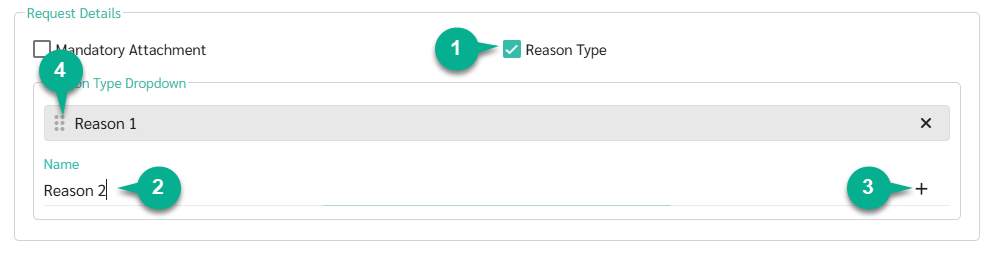
- Check the Reason Type box to require employees to select a reason when submitting a request.
- Once enabled, a Name field appears for entering reason options.
- Type a reason name, then click + or press Enter to add it to the list.
- Drag to reorder the list as needed.
Mandatory Attachment
Check the Mandatory Attachment box to require employees to attach a supporting document with every request.

OT Rule Settings
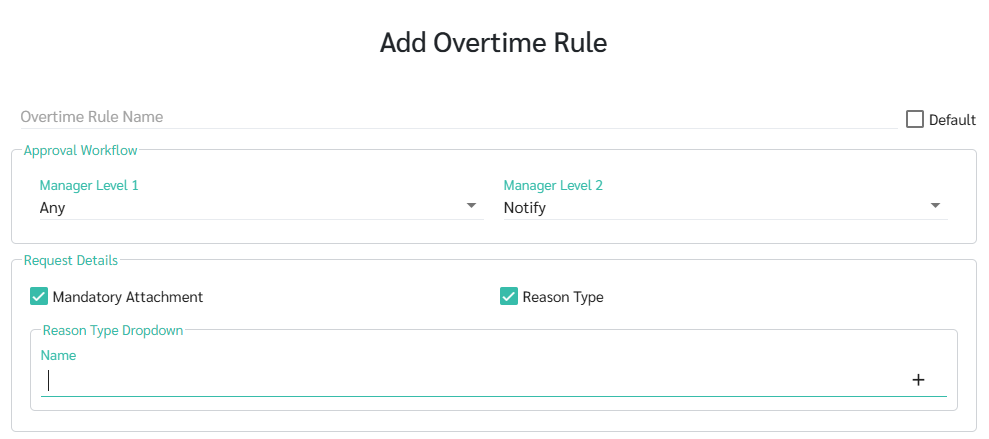
- Go to Preferences > Attendance > Overtime Rules.
- Select the OT rule you want to configure, or create a new one.
- Under Request Details, configure the settings as needed.
- Click Save.
- See more: Overtime Rules LEARN MORE
Leave Type Settings
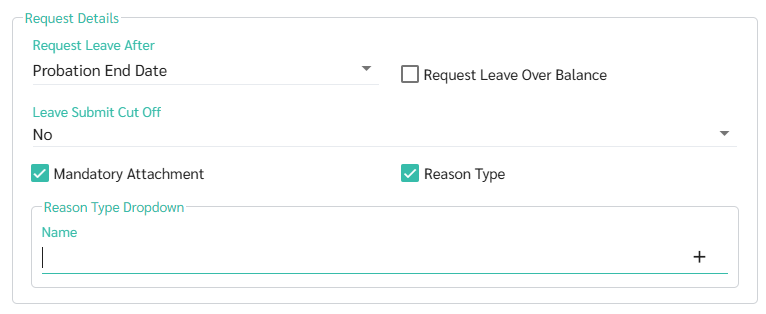
- Go to Preferences > Employees > Leaves.
- Select the leave type you want to configure, or create a new one.
- Under Request Details, configure the settings as needed.
- Click Save.
- See more: Add New Leaves LEARN MORE
Payment Settings (Reimbursement)
- Go to Preferences > Payroll > Payments.
- Select the payment you want to configure, or create a new one.
- Go to the Settings tab.
- Check the Submit Request and Mandatory Attachment checkbox.
- Under Request Details, Form EA Field and Tax Exemption Amount, configure the settings as needed.
- Click Save.

- See more: Add New Payments LEARN MORE
Employee View
Once these settings are enabled, employees will see the following when submitting a request:
-
Reason Type enabled:
The request form displays a dropdown for employees to select a reason. Employees must select a reason before they can submit the request.
-
Mandatory Attachment enabled:
Employees must attach a document before submitting. The system will not allow submission without an attachment.
Notes 🗒️
Settings changes apply to requests submitted after saving. Existing requests are not affected.