
Create Single Overtime Request
💬 Note
- To submit Overtime Requests, Overtime Rules must be properly configured according to company regulations.
- For example, Overtime on a regular weekday may be paid at 1.5 times the Hourly Rate Pay.
- For employees assigned to Shift Schedule, the Shift Schedule Settings must be configured to allow employees to submit Overtime Requests.
- Refer to the article on setting up Shift Schedule at this LINK.
How to Submit an Overtime Request
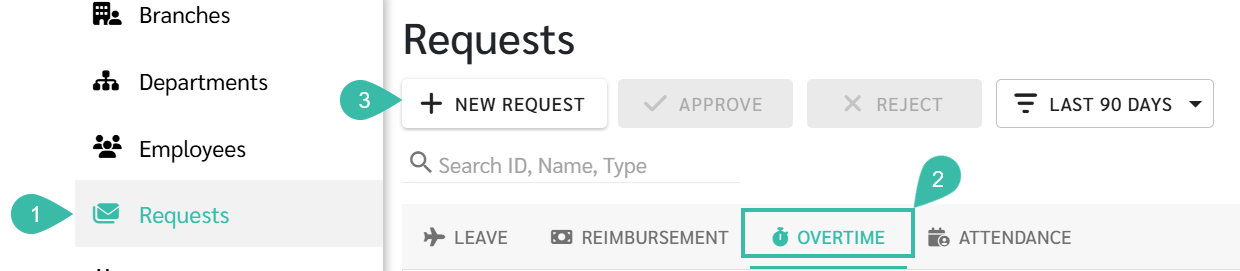
- Go to Requests tab.
- Select Overtime.
-
Click + New Request.
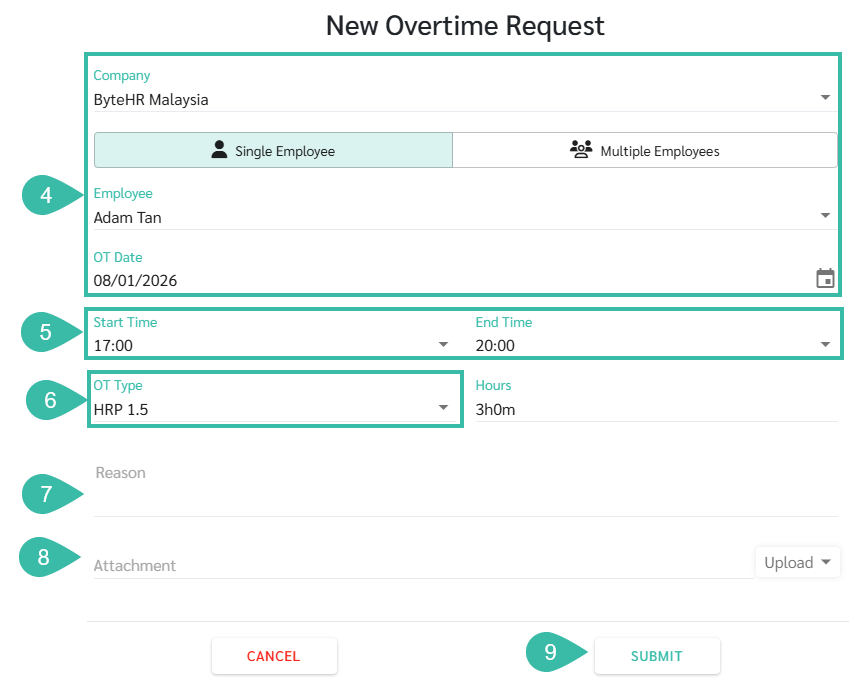
- Select Company, Employee, and OT Date
- Enter the Start Time and End Time.
- Select the Overtime Type.
- Weekdays: The system automatically displays the applicable OT Type.
- Rest Day or Public Holidays: The system displays available Overtime Type options based on configured Overtime Rules.
- State the reason for requesting Overtime.
-
Attach supporting documents by clicking Upload.
***Up to five documents may be attached (Maximum file size: 7MB; Maximum image size: 10MB).***
-
Click Submit.
📃 Note
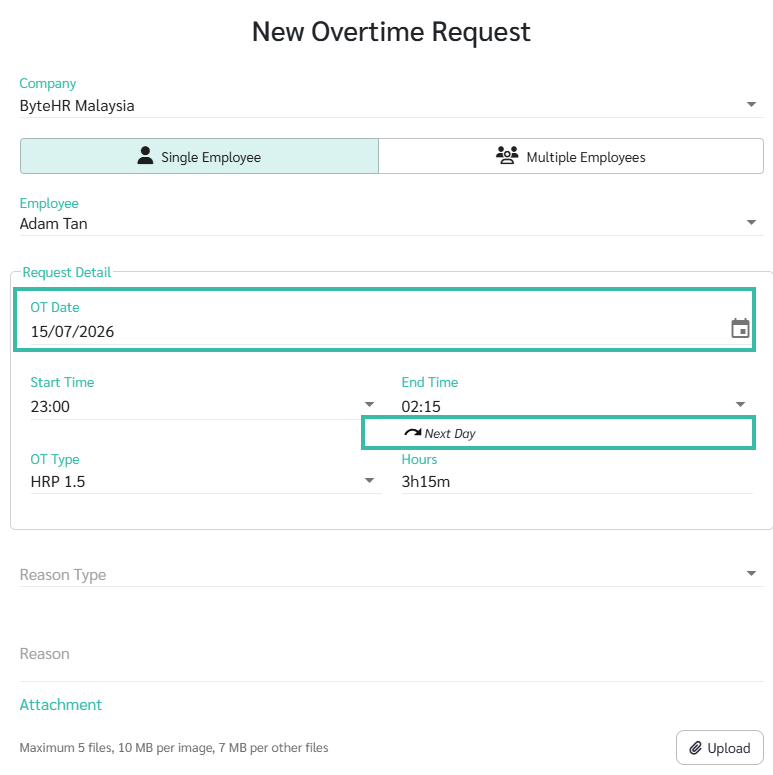
- When an Overtime request spans across different days, the system will display:
- OT Date: The actual date the Overtime occurred.
-
End Time: The system shows Next Day.
- It is not possible to prevent employees from submitting retroactive Overtime requests.
🏷️ Case
The system calculates Overtime Hours based on the employee's Shift configuration:
- Regular Shift Schedule
- Overtime starts counting after the scheduled Shift End Time, unless Overtime breaks are deducted (Deduct OT Break).
- Flexible Shift Schedule
- Overtime starts counting after the total required working hours (including breaks) have been completed.
Example:
Regular Shift Schedule:
| Shift Time | Timestamp | Overtime Request (Normal Working Day) | Timesheet |
|---|---|---|---|
|
Start Time: 09:00 End Time: 17:00 |
Sign In: 08;22 Sign Out: 19:45 |
Start Time: 17;00 End Time: 19:00 Overtime Type: HRP 1.5 Deduct OT Break: 00:30 |
OT Hours:1:30 (Calculate OT from 17:30 to 19:00) |
Flexible shift schedule:
| Shift Time | Timestamp |
Overtime Request (Normal Working Day) |
Timesheet |
|---|---|---|---|
| Shift Hours/Day (Include Break): 09:00 |
Sign In: 08:22 Sign Out: 19:45 |
Start Time: 16:30 End Time: 19:00 OT Type: HRP 1.5 Deduct OT Break: 00:30 |
OT Hours: 1:38 (calculate OT from 17:22 to 19:00) |
Flexible shift schedule:
| Shift Time | Timestamp | Overtime Request (Rest Day) | Timesheet |
|---|---|---|---|
| Shift Hours/Day (Include Break): 09:00 |
Sign In: 14:30 Sign Out: 20:30 |
Start Time: 14:00 End Time: 17:00 OT Type: ORP 0.5 Deduct OT Break: 00:30 |
OT Hours: 02:30 (calculate OT from 14:30 - 17:00) |
| Shift Hours/Day (Include Break): 09:00 |
Sign In: 17:00 Sign Out: 20:00 |
Start Time: 17:00 End Time: 20:30 OT Type: ORP 0.5 Deduct OT Break: 00:30 |
OT Hours: 02:30 (calculate OT from 17:00- 20:00) |