
The Settings for Salary and Overtime are Different
Question: What happens when the Salary and Overtime calculation periods are different? For example, Salary cut off is the 20th of each month, while Overtime cut off is at the end of the previous month; or Salary is paid twice a month, but Overtime is paid once a month in the second payroll period. How do you set up the Salary cut off dates and Overtime cut off dates?
Answer: The admin can set up the Salary and overtime cut off dates in several ways. Below are some examples.
🏷️ Case 1:
If the Salary Payment Schedule is once a month, you cannot select a different Payment Schedule for Overtime. The Overtime Payment Schedule will also be once a month, but the Overtime cut off date can be different from the Salary date.
If the Overtime period is the current period, the Overtime cut off date cannot be after the Salary cut off date.
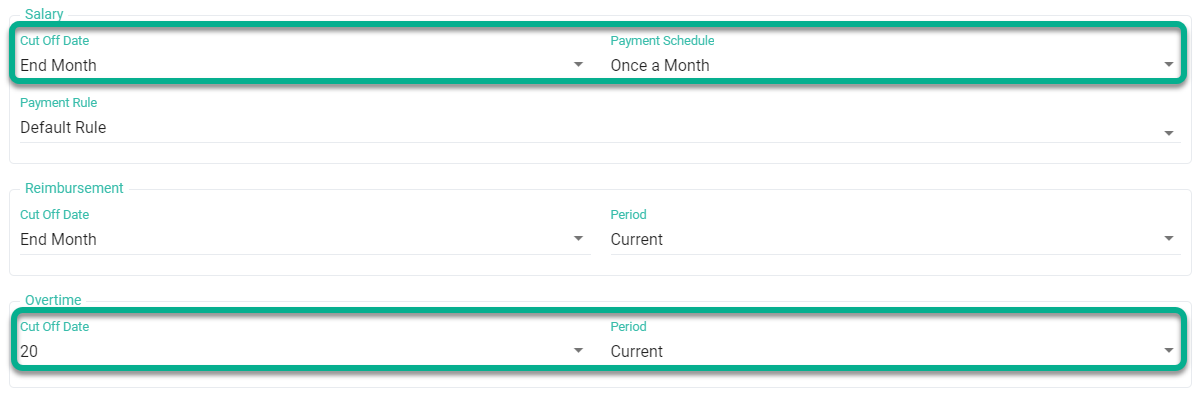
| Payroll Settings |
Payment Period: November 2025 |
|---|---|
| Salary | Salary Cycle |
| Cut-off Date: End of the month | 01/11/2025 - 31/11/2025 |
| Payment Schedule: Monthly | |
| Overtime pay | Overtime Cycle |
| Cut-off date: 20 | 21/10/2025 - 20/10/2025 |
| Period: The current period |
🏷️ Case 2
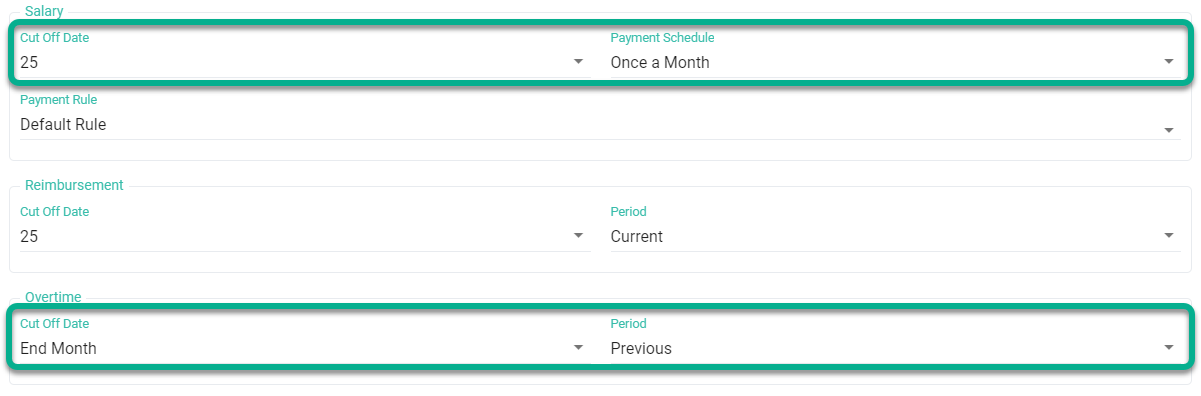
| Payroll Settings |
Payment Period: August 2025 |
|---|---|
| Salary | Salary Cycle |
| Cut-off date: 25 | 26/07/2025 - 25/08/2025 |
| Payment Schedule: Monthly | |
| Overtime pay | Overtime Cycle (OT Cycle) |
| Cut-off Date: End of the month | 01/07/2025 - 31/07/2025 |
| Period: Previous period |
🏷️ Case 3:
If the Salary Payment Schedule is twice a month and Overtime is once a month, it is not possible to change the overtime cut off date. The Overtime cut off date is the same as the Salary cut off date. You can only select whether the Overtime is for the Current or Previous period.
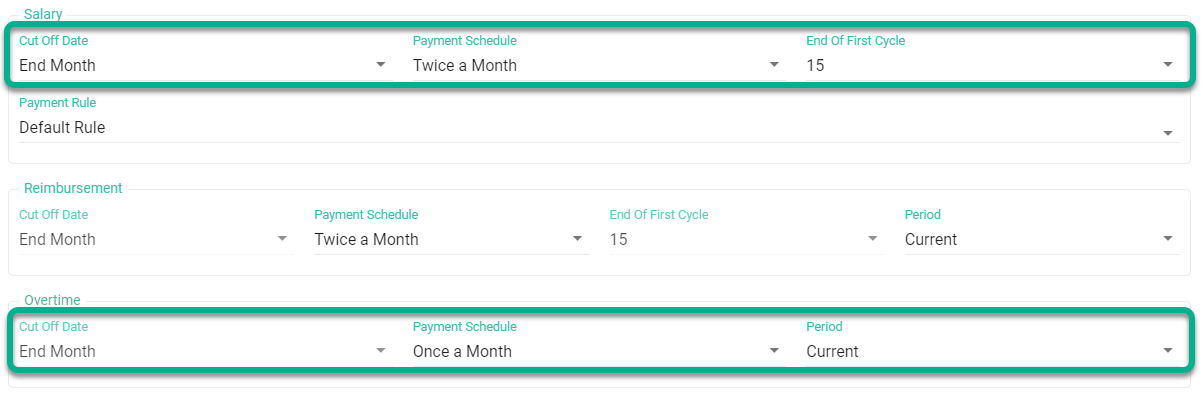
| Payroll Settings |
Payment Period: August 2025 |
|---|---|
| Salary | Salary Cycle |
| Cut-off Date: End of the month |
First Cycle: 01/08/2025 - 15/08/2025 Last Cycle: 16/08/2025 - 31/08/2025 |
| Payment Schedule: Twice a month. | |
| End of First Salary Cycle: 15 | |
| Overtime pay | Overtime Cycle (OT Cycle) |
| Cut-off Date: End of the month |
First Cycle: Not displayed. Last Cycle: 01/08/2025 - 31/08/2025 |
| Payment Schedule: Monthly | |
| Period: The current period |
🏷️ Case 4
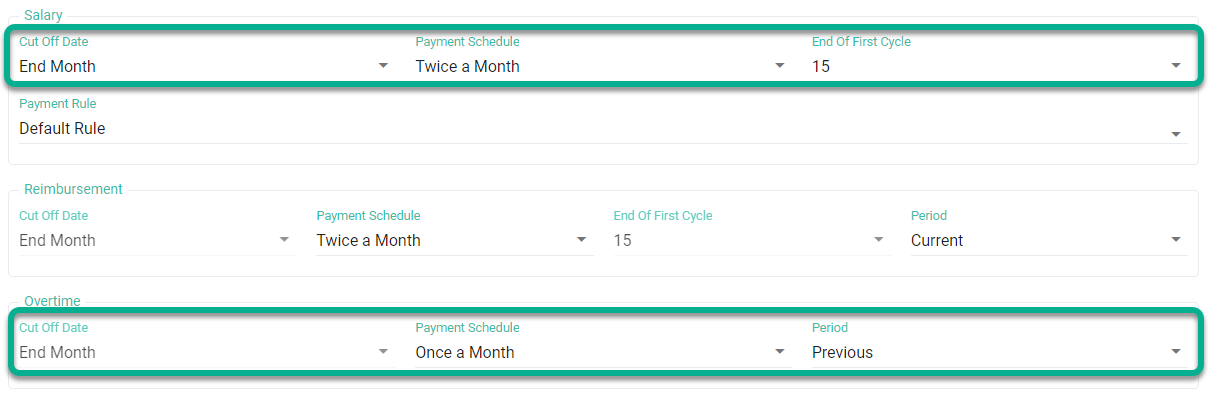
| Payroll Settings |
Payment Period: August 2025 |
| Salary | Salary Cycle |
| Cut-off Date: End of the month |
First Cycle: 01/08/2025 - 15/08/2025 Last Cycle: 16/08/2025 - 31/08/2025 |
| Payment Schedule: Twice a month. | |
| End of First Salary Cycle: 15 | |
| Overtime pay | Overtime Cycle (OT Cycle) |
| Cut-off Date: End of the month |
First Cycle: Not displayed. Last Cycle: 01/07/2025 - 31/07/2025 |
| Payment Schedule: Monthly | |
| Period: Previous period |
🏷️ Case 5:
If the Payment Schedule for both Salary and Overtime is twice a month, it is not possible to change the Overtime cut off date. The Overtime cut off date will be the same as the Salary cut off date. You can only select whether the Overtime period is for the Current or Previous period.
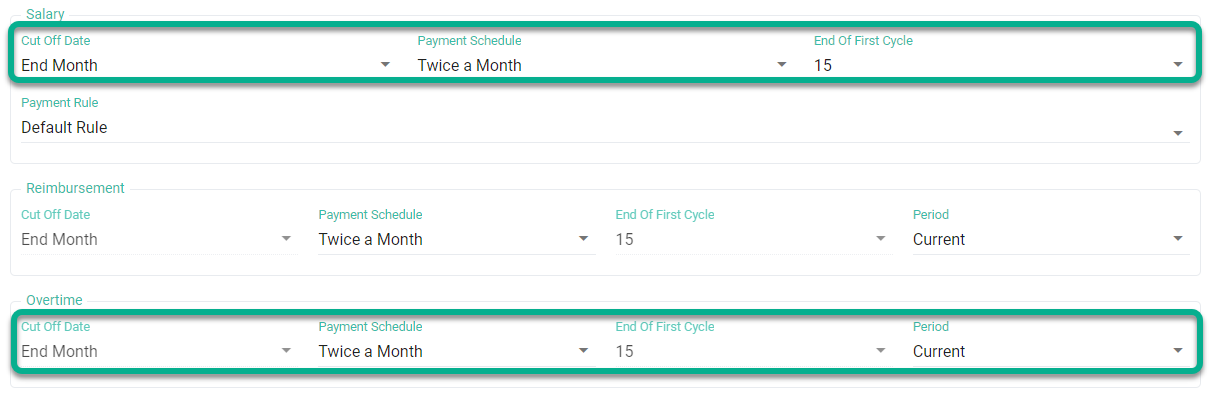
| Payroll Settings |
Payment Period: August 2025 |
|---|---|
| Salary | Salary Cycle |
| Cut-off Date: End of the month |
First Cycle: 01/08/2025 - 15/08/2025 Last Cycle: 16/08/2025 - 31/08/2025 |
| Payment Schedule: Twice a month. | |
| End of First Salary Cycle: 15 | |
| Overtime pay | Overtime Cycle (OT Cycle) |
| Cut-off Date: End of the month |
First Cycle: 01/08/2025 - 15/08/2025 Last Cycle: 16/08/2025 - 31/08/2025 |
| Payment Schedule: Twice a month. | |
| End of First Salary Cycle: 15 | |
| Period: The current period |
🏷️ Case 6
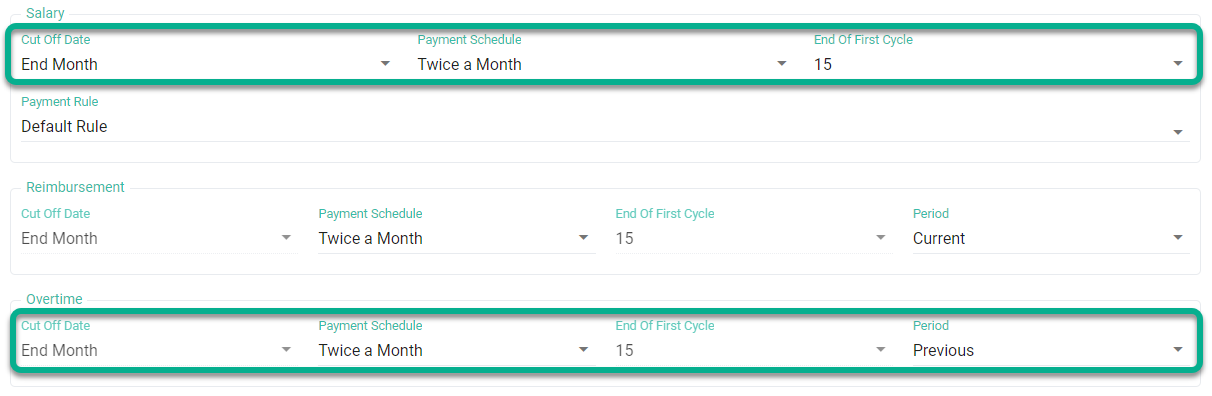
| Payroll Settings |
Payment Period: August 2025 |
| Salary | Salary Cycle |
| Cut-off Date: End of the month |
First Cycle: 01/08/2025 - 15/08/2025 Last Cycle: 16/08/2025 - 31/08/2025 |
| Payment Schedule: Twice a month. | |
| End of First Salary Cycle: 15 | |
| Overtime pay | Overtime Cycle (OT Cycle) |
| Cut-off Date: End of the month |
First Cycle: 16/07/2025 - 31/07/2025 Last Cycle: 01/08/2025 - 15/08/2025 |
| Payment Schedule: Twice a month. | |
| End of First Salary Cycle: 15 | |
| Period: Previous period |