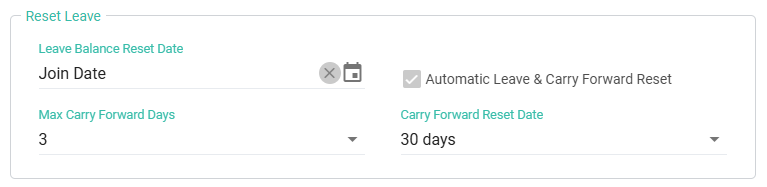
Leave Reset Example
Leave Reset Settings
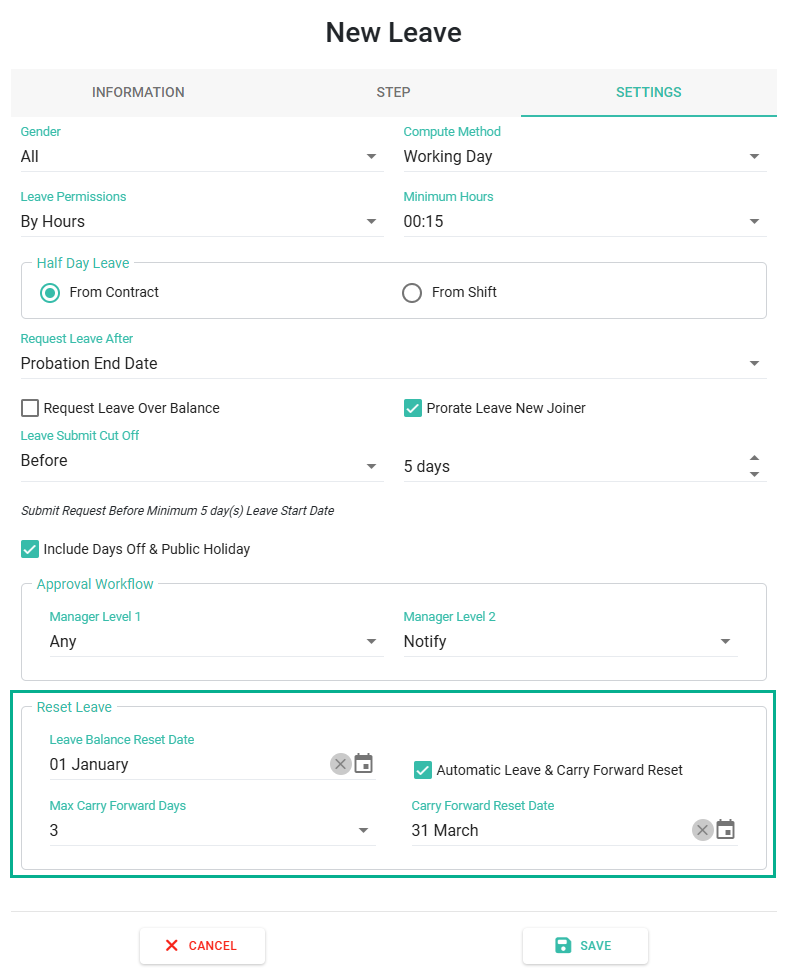
Leave reset settings can be configured as follows:
- Go to the "Settings" tab for the selected Leave Type.
- In the "Reset Leave" section, configure the following:
- Leave Balance Reset Date
- Automatic Leave & Carry Forward Reset
- Max Carry Forwards Days
- Carry Forward Reset Date
- Each field has the following meaning:
- Leave Balance Reset Date:
- This is the date when the system resets the Leave Allowance Days, Used Leave Days, Leave Balance Days, and Carry Forward Days,
- The reset occurs 00:00 on the selected date.
- For example, If the Leave Balance Reset Date is set to 1 January, Leave balances reset at 00:00 on 1 January each year.
- Automatic Leave & Carry Forward Reset:
- When the Automatic Leave & Carry Forward Reset checkbox is ticked, the system will automatically reset Leave Balances.
- Accumulated Leave Days will be carried forward automatically, based on the configures limits.
- If this checkbox is unticked, the admin must reset leave balances manually.
- Maximum Carry Forward Days:
- Defines the maximum number of Leave Days that can be carried forward from the previous year.
- Examples:
- Remaining Leave = 5 Days, Max Carry Forwards Days = 3 Days -> 3 days Carried forward.
- Remaining Leave = 3 Days, Max Carry Forwards Days = 3 Days -> 3 days Carried forward.
- Remaining Leave = 2 Days, Max Carry Forwards Days = 3 Days -> 2 days Carried forward.
- Carry Forward Reset Date:
- Determines the cut-off date for using accumulated Carried Forward Leave.
- Accumulated Carried Forward Leave resets at 00:00 on the configured date.
-
For example, if the Carry Forward Reset Date is 31 March, employees can use their accumulated carry forward leave until 30 March. The balance resets at 00:00 on 31 March.
📢Important Note: ByteHR's leave calculation based on years of service is based on an average proportion of the employee's actual years of service.
- Leave Balance Reset Date:
- For Example:
- Leave Balance Reset Date: 1 January
- Automatic Leave & Carry Forward Reset enabled
- Max Carry Forward Days: 3 days
- Carry Forward Reset Date: 31 March
-
Leave Balance resets automatically on 1 January. Up to 3 days of unused Leaves can be carried forward. Accumulated 3 days of Carried Forward Leaves must be used before 31 March.
- If the Leave Balance Reset Date is configured as Join Date:
- The system resets Leave Balances annually based on each employee's Join Date. Leave Balances reset at 00:00 on the employee's Join Date each year.
- Remaining Leave Days are carried forward based on the Max Carry Forward Days.
- Accumulated Carry Forward Leave will expire on the configured Carry Forward Reset Date.
- Examples:
- Remaining Leave Days: 5 Days, Max Carry Forward Days: 3 Days -> Leave Carried Forward: 3 Days.
- Remaining Leave Days: 3 Days, Max Carry Forward Days: 3 Days -> Leave Carried Forward: 3 Days.
- Remaining Leave Days: 2 Days, Max Carry Forward Days: 3 Days -> Leave Carried Forward: 2 Days.
-
Carry Forward Reset Date:
For example, if an employee joined work on 1 January, they can use their 3 days of accumulated carry forward leave until 30 January, as the system will reset the remaining leave days carried forward at 00:00 on 31 January of each year.