
Auto Upload Fingerscan from ZK Teco
How to Automatically Upload Fingerprint Scans from a ZK Teco Fingerprint Scanner
Once the Fingerprint Scanner is successfully connected to the ByteHR software, you can upload the timestamps from the fingerprint scanner following the steps below:
- Go to Timesheets.
-
Click on Upload.

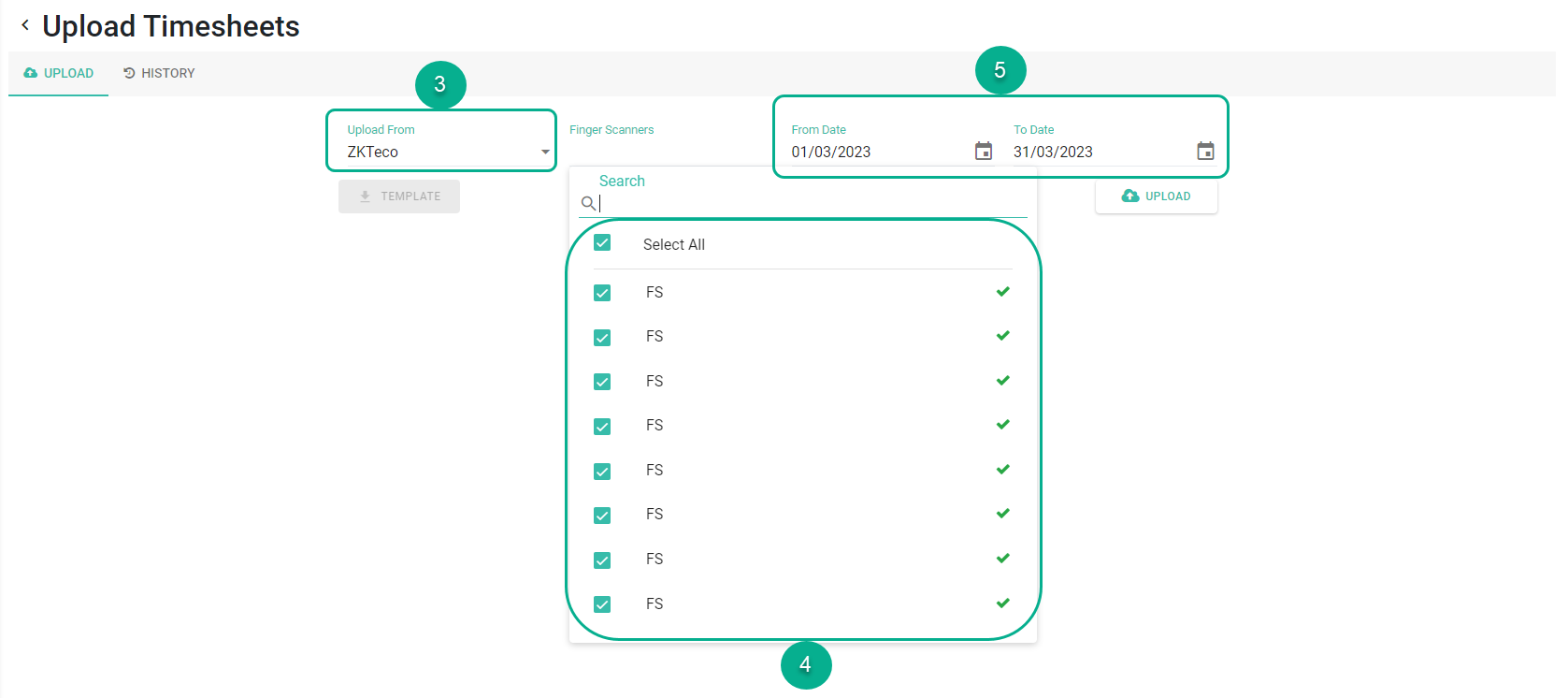
- Select Upload from ZK Teco.
- Select the active Finger Scanners you want to upload data from. The system will only display the currently active fingerprint scanners. Multiple scanners can be selected simultaneously.
- The system will attempt to connect:
- Connected successfully will appear if the connection works.✅
-
Connection failed will appear if unsuccessful, along with the reason.

- The system will attempt to connect:
-
Fill in the details of From Date and To Date for the data you want to retrieve.
-
Click Upload. The system will load and display the timestamp information of the employees.


