
Transferring Account Ownership
💬 Note
- In the ByteHR system, only one Account Owner is allowed per account. The Account Owner has access to Subscription packages, and Payment schedules
- If the current Account Owner is leaving the company or can no longer manage the account, Account ownership can be transferred to another user.
How to Transfer Account Ownership
The Account Ownership can be transferred to another user:
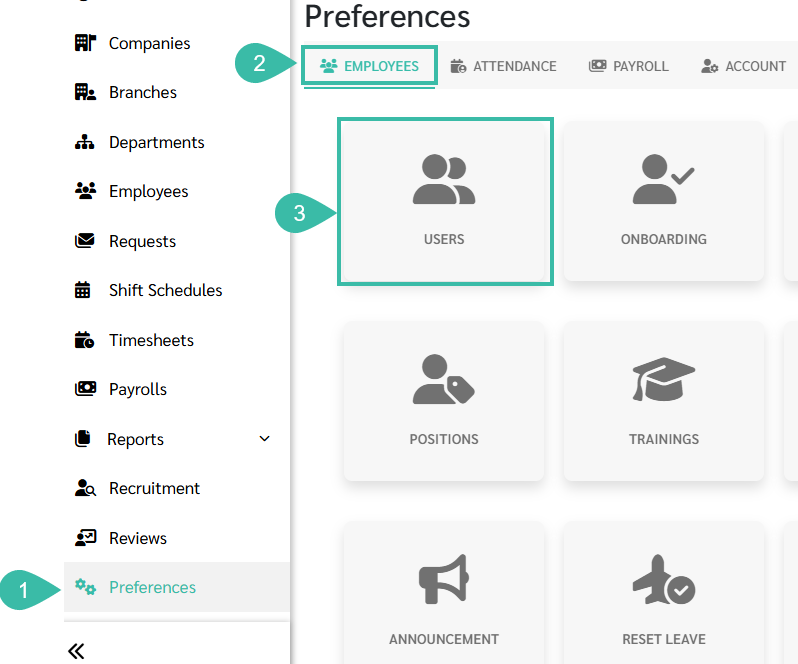
- Go to Preferences tab.
- Click Employees.
-
Select Users.
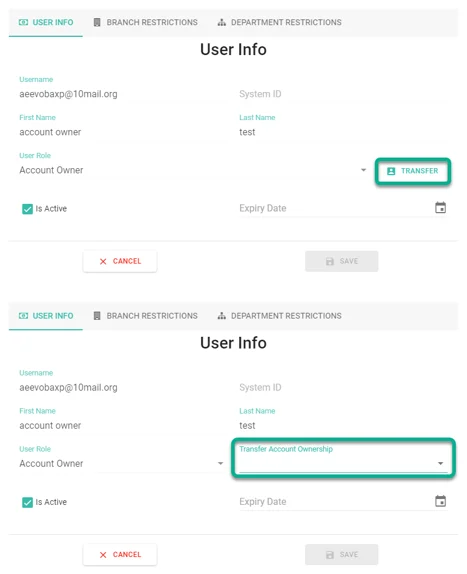
- Locate and click on the current Account Owner.
- Click Transfer.
- Enter the email address of the user you want to assign as the new Account Owner. The system will automatically display the user's System ID, First Name and Last Name
-
Click Save to complete the Transfer.
Note
- Account Owner ownership cannot be removed from the system.
- If an Account Owner resigns or leaves the company, ownership can be transferred to another admin.