
Create Attendance Request - Edit Sign In/Out
How to Submit Edit Sign In/Out Request
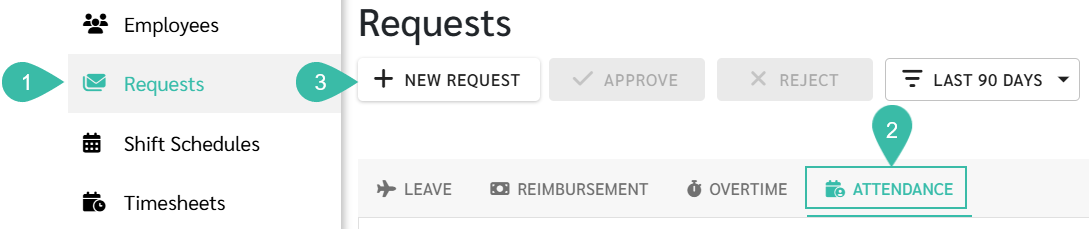
- Navigate to Requests tab.
- Select Attendance.
-
Click +New Request.
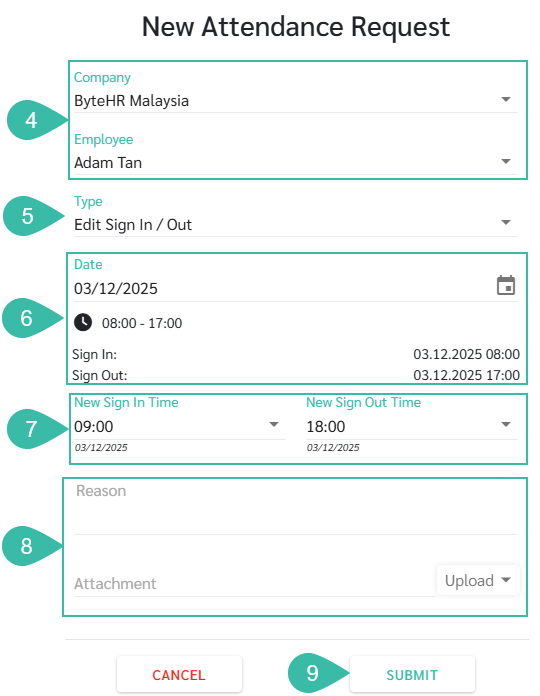
- Select the Company, and Employee.
- .Select Edit Sign In/Out as the request Type.
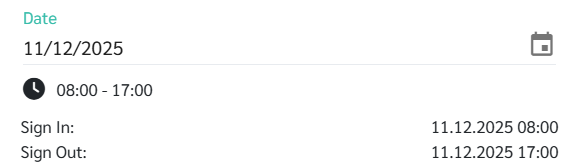
- Select the Date to be edited.
-
The system will display the Shift Start and End Time, as well as the previous clock-in/clock-out times.
-
- Enter the New Sign In Time and New Sign Out Time.
-
Enter Reason and Attach supporting document.
***Up to five attachments is allowed. Maximum Document size 7MB. Maximum Image size 10MB.***
-
Click Submit.
💬 Note
- Once the Edit Sign In/Out Request is Approved:
- The requested New Sign In Time and New Sign Out time will be reflected in the Timesheet.
- The system will display the Edit Sign In/Out Request ID in the Request tab if the Timesheet.
🚩 Rules: Rules for submitting requests to modify work hours (clock in/out).
- Edit Sign In/Out Request cannot be submitted for the current or future date.
- Requests can only be submitted for past attendance records like Absence, Invalid Data, Lateness, Out Early, Public Holidays, and Days Off/ Rest Day.
- Once the Timesheet has been approved for Payroll processing, Edit Sign In/Out Request cannot be submitted.
-
If attempted, the system prompts an error message 'Approved timesheet exist".

- Multiple Edit Sign In/Out Requests cannot be submitted on the same date.
- Edit Sign In/Out Request cannot be submitted for a Full Day Leave.
- For Half-Day or Hourly Leave, the Edit Sign In/Out times must not overlap with Approved Leave Hours.
- The Timestamps data from e-CheckIn, Auto Sync, Uploaded Files will still be visible in the Timestamps tab of the Timesheet, even if the Edit Sign In/Out times are updated in the Timesheet.
- Employees on Flexible Shifts cannot Submit Edit Sign In/Out Requests after 23.59.
The price of each add-on feature depends on the number of employees in your package and will be prorated according to your billing cycle.