
Create Attendance Request - Swap Shift for Flexible Shifts
How to Submit Swap Shift Request
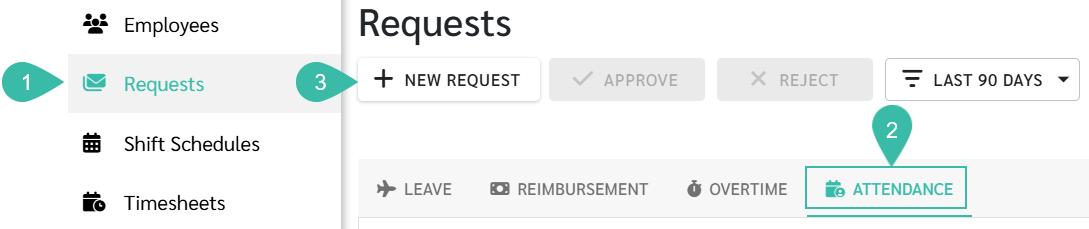
- Navigate to Requests tab.
- Select Attendance.
-
Click + New Request.
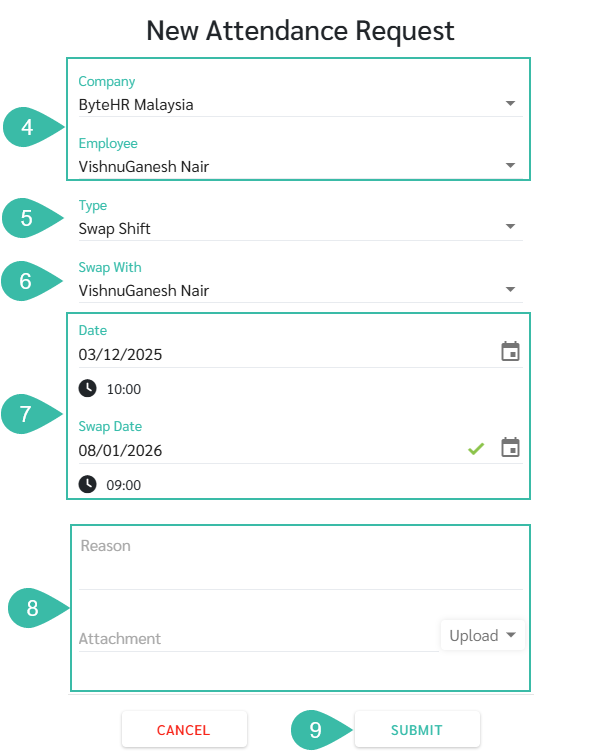
- Select the Company and Employee.
- Select Swap Shift as the request Type.
- In the Swap With field, select the employee you want to swap shifts with
- If the employee is swapping shifts with themselves, select the same employee name.
- Select the Date and the Swap Date. In the Date field, select the date you want to change. In the Swap Date field, select the date you want to swap with.
- The system will display the number of working hours for each date based on the the Flexible Shift Schedule.
- If the system displays "Day Off," it indicates the chosen date is a weekly day off.
-
Enter Remarks and Attach supporting documents (if any).
***Up to five Attachments is allowed. Maximum Document size is 7MB. Maximum Image size is 10MB.***
-
Click Submit.
💬 Note
- After submitting a Swap Shift Request, the status will change to Submitted.
- Once the employee you are swapping Shift with Accepts the request, the status will be updated to Accepted.
- If Approved by the Manager, the status will change to Approved.
- If Rejected, the status will be updated to Rejected.
- If the employee Cancels the Request before Approval or Rejection, the status will change to Cancelled.
- Once Swap Shift Request is Approved, the employee's Timesheet and Calendar will be updated automatically.
🚩 Rules: Rules for requesting shift swaps.
- A Swap Shift cannot be submitted if there is already Edit Shift or Swap Shift Request on the same date regardless of the submission status.
-
If attempted, the system will prompt an error message below the selected date as "Edit shift request exists on this date".

-
A Swap Shift Request can only be Submitted when the Shift Hours of the two selected dates are different.
Example:
28/09/2025 -> Shift Hours/Day: 9 Hours
29/09/2025 -> Shift Hours/Day: 9 Hours
30/09/2025 -> Shift Hours/Day: 10 Hours
- 28/09/2025 -> 30/09/2025: Swap Shift is allowed because it has different Shift Hours.
- 28/09/2025 -> 29/09/2025 Swap Shift is not allowed because it has the same Shift Hours
