
Print Payslip from Mobile App
Log in to ByteHR Mobile App -> Tab Payslips tab -> Select the Payslip you'd like to download -> Tap the Download Icon on the Payslip Details page -> Click View File to view PDF File and select the folder to save this Payslip.
Employees can Download or Print Company-Issued Payslips from the ByteHR Mobile App by following the steps below:
- Tap the Payslip tab.
-
Select the Payslip for the desired Pay Period.
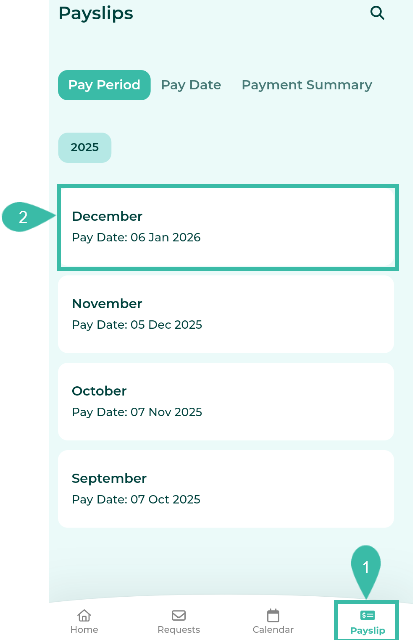
-
Tap the Download option on the Payslip Details page to download.
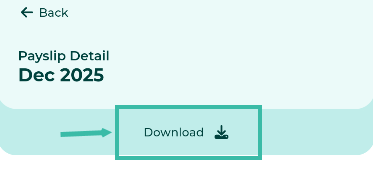
- Once the download is complete, tap "View File" to open the payslip PDF.
-
The Payslip will be downloaded in the PDF Format according to the Payslip Format specified in the company/branch's payroll settings.
Example of a Payslip downloaded via the Mobile App.


📢 Important Note
The Payslip format that employees download from the mobile application depends on the Payslip Format type selected in the Company/Branch Payroll Setting.
The pricing for the Payslip feature depends on the number of employees in your package and will be prorated according to your billing cycle.