
Out Early/Late Deduction During Break Time
Question: How does the system calculate late deduction for employees who went out early or return late from their break?
Answer: The system includes Shift Break configured in the Shift Schedule when calculating late/out early deductions if the deduction rule is configured to deduct late minutes.
Question: How the system determines Out early before break and late after break?
Answer: The system identifies timestamps based on the configured Shift Break.
- To determine whether an employee went Out Early before break, the system checks:
- The last clock-out before the break starts.
- The timestamp must fall within 2 hours before the break start time.
- To determine whether an employee returned Late after break, the system checks:
- The first clock-in after the break end time.
- The timestamp must fall within 2 hours after the break end time.
- Example:
| Shift Start Time | 08:00 AM |
| Shift End Time | 17:00 PM |
| Break Start Time | 12:00 PM |
| Break End Time | 13:00 PM |
| Actual Timestamps | 08:00 AM;10:30 AM; 14:00 PM; 15:00 PM; 17:00 PM |
Out Early before Break:
- The system checks the last clock-out between 10:00 AM and 12:00 PM.
- Last clock-out = 10:30 AM
- Employee left 90 minutes before the scheduled break.
- Out Early = 90 minutes
Late after Break:
- The system checks the first clock-in between 13:00 PM and 15:00 PM.
- First clock-in = 14:00 PM
- Employee returned 60 minutes late.
- Late After Break = 60 minutes
Question: Where can I view the daily report on Out Early Minutes or Late Minutes for Break Time?
Answer: You can view the Out Early Minutes (Break) and Late Minutes (Break) in the Attendance Details Report.
- Go to Attendance Details Report.
-
Open the Column Chooser.

-
Select Out Early Minutes (Break) and Late Minutes (Break) under Attendance Details.
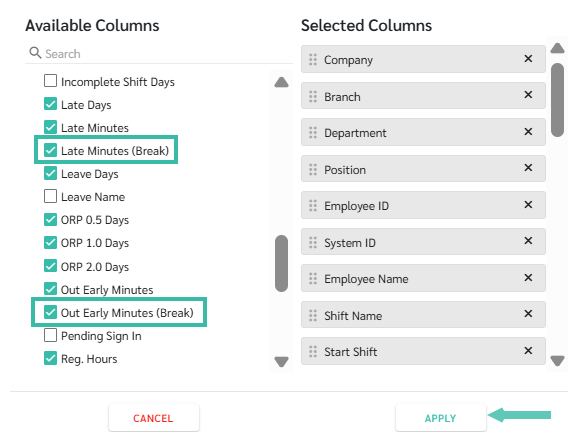
- Drag both columns next to the Date of Work column for easier viewing.
- You may filter by Employee Name to view the employee's daily Out Early Minutes (Break) and Late Minutes (Break).
- The total Out Early Minutes (Break) and Late Minutes (Break) will be displayed at the bottom of each respective column.

