CP22 Report (New Joiner Notification)
CP22 report generates the LHDN new joiner notification file for your Malaysian employees directly from ByteHR. Malaysian employers must notify LHDN within 30 days of an employee's commencement date. This report produces a ready-to-upload TXT file so you don't need to prepare it manually.

How to Use
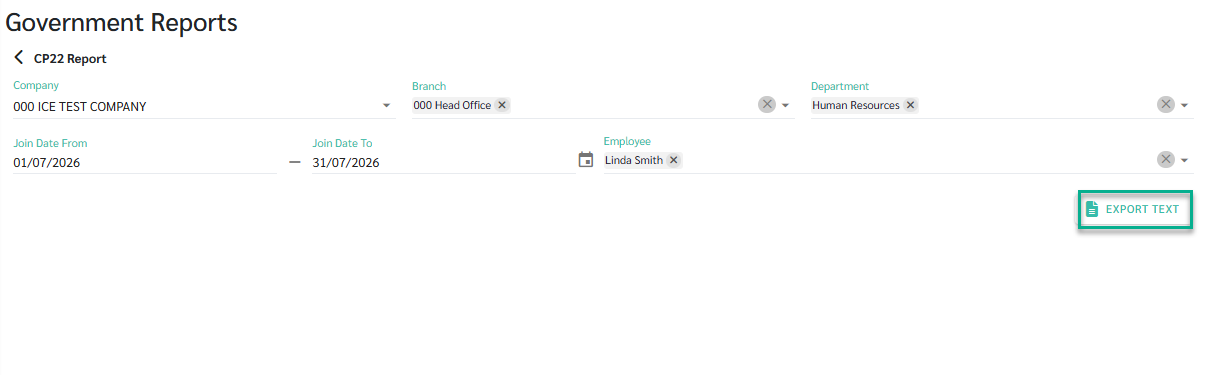
- Go to Reports > Government Reports > Other Statutory Forms > CP22.
- Set your filters: Company, Branch, Department, and Join Date From/To. The Join Date range can be up to 1 month.
- Select the employees to include, or leave it as default to include all.
- Click Generate File.
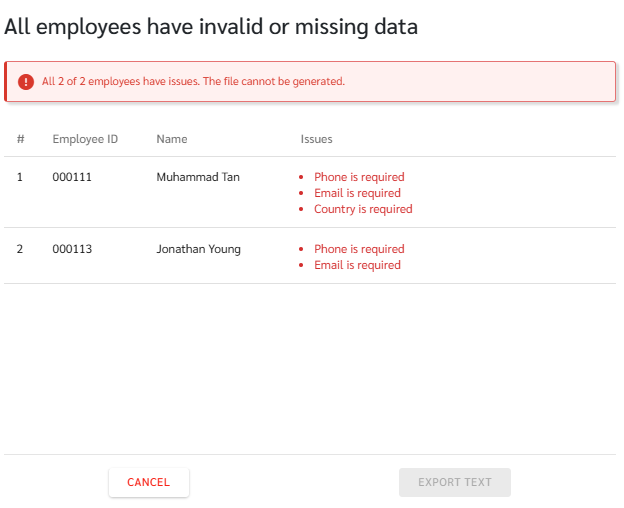
- If any selected employees have missing or invalid data, a popup lists each affected employee with the exact fields to update. Choose Ignore invalid employees and continue to export only the valid employees, or Cancel to stop and fix the data first.
- The system produces one TXT file containing all selected employees, named after your Company's E Number.
- Download the file and upload it to the LHDN MyTax e-Filing portal.
Why an employee might get flagged
The system checks the following before generating the file. If any of these are missing, the employee is listed in the popup and excluded unless you fix the data first:
- Gender is not set to Male or Female. LHDN does not accept "Not Specified."
- Marital Status is blank.
- NRIC Number is blank, for employees whose Nationality is Malaysia or who are a Malaysia PR.
- Passport Number, Passport Expiry Date, or Passport Issuing Country is blank, for employees who are not Malaysian and not a Malaysia PR.
- Phone is blank.
- Email is blank.
- Spouse Name is filled in, but neither Spouse NRIC Number nor Spouse Passport Number is filled in.