
Company, Branch, and Employee Address
To ensure employee address data in the system is accurate and meets the standard required for issuing important documents, ByteHR has updated the address entry experience with a more convenient formatม especially for Admins managing employee address information.
1. How to Fill in Address Fields Correctly
To ensure address data displays cleanly in reports and documents, you do not need to repeat the field label (such as "No." and "State") in the input. Enter the name or number only.
Example:
- House No: 2
- Road/Street: Jalan Ampang
- Building Name: Petronas Twin Towers
- Sub District: Kampung Baru
- City/Town: Kuala Lumpur
- State: Kuala Lumpur
- Postal Code: 50088
2. Auto-Populate Postal Code System
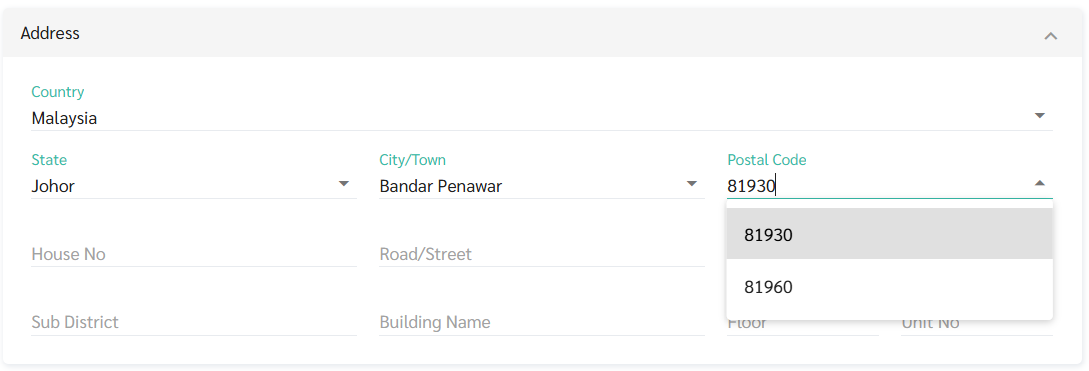
When Country is set to Malaysia, the system switches State, City/Town, and Postal Code from free-text fields to dropdowns preventing typos and making it faster to find the correct location.
Steps:
- Select State
- Select City/Town
- Postal Code
- If the area has one postal code: the system auto-populates it
- If the area has multiple postal codes: a dropdown appears for you to select the correct one
Note: To ensure data accuracy, the system does not allow manual entry of postal codes outside the options provided.
3. Importing Addresses via File (Employee Import)
For Admins who need to update a large number of employee records via Excel:
- Auto-match: If State and City/Town in the file are correct, the system will automatically calculate and fill in the postal code during import.
- If data does not match: If the values in the file do not match the database (e.g. misspelled city name or mismatched postal code), the system will show the status "Invalid Value".
- Fix: Click Fix to select the correct value from the system's suggestions before confirming the import.
Note 🗒️
- If Country is not Malaysia, all remaining address fields remain free-text as normal.
- If you do not want to use the dropdown fields. For example: when importing records where address data is not yet complete, enter "." in the Country field. This allows all address fields to be filled as free-text.