
Upload Tax Deduction
There are two ways to upload tax deductions:
- Upload via Employees tab.
- Upload via Preferences tab.
Upload from the Employee Page
- Go to the Employees tab.
- Click on Upload Employees icon.
-
Select Tax Deduction Employees.
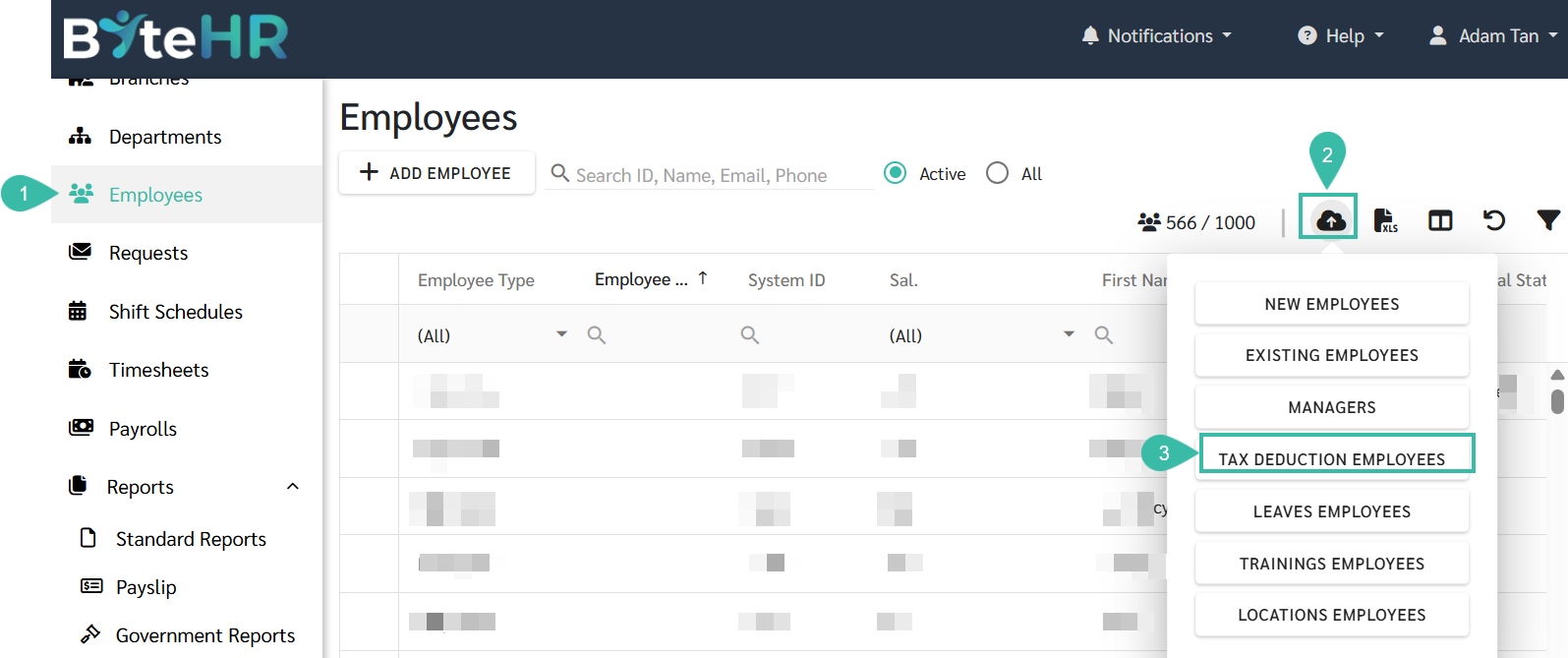
- Upload Employees Tax Deduction page will be displayed.
-
Click on the Template to download the template.

-
Once completed, return to the Upload Employees Tax Deduction page. Select the company for which you wish to upload the tax deduction, and click Next.

-
Select the file to upload.
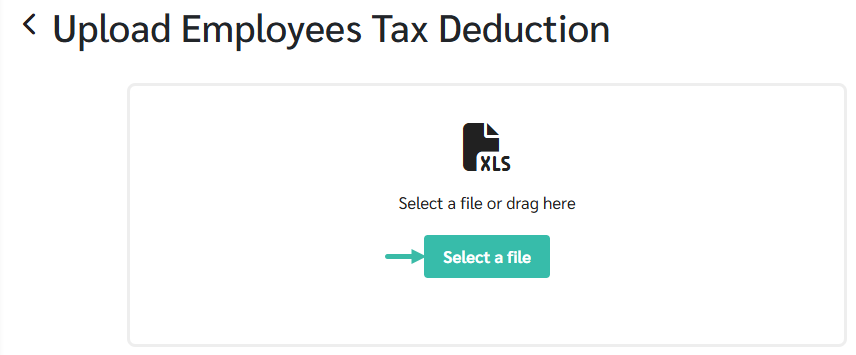
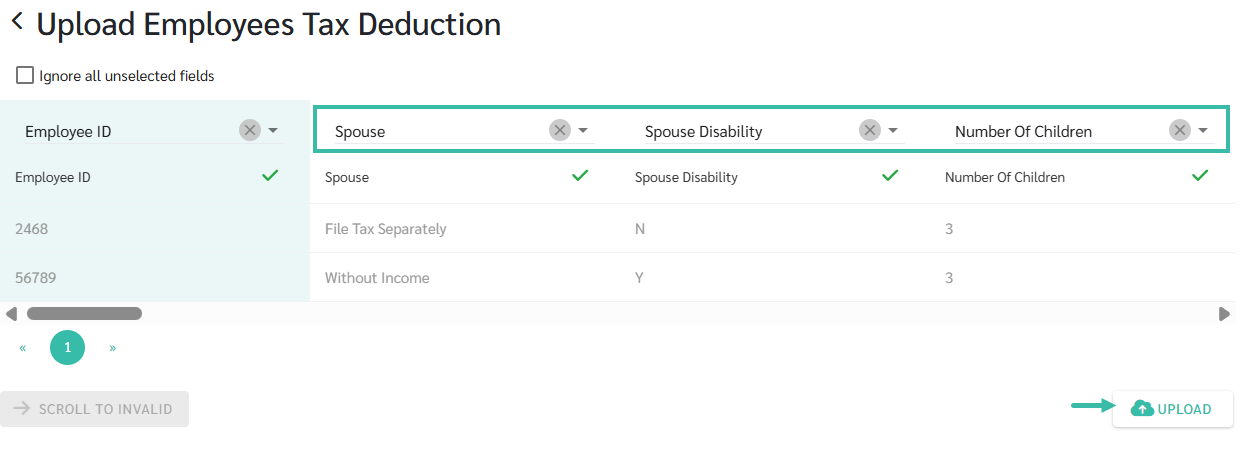
- Map the fields accordingly.
-
Click Upload
Upload from the Preferences page
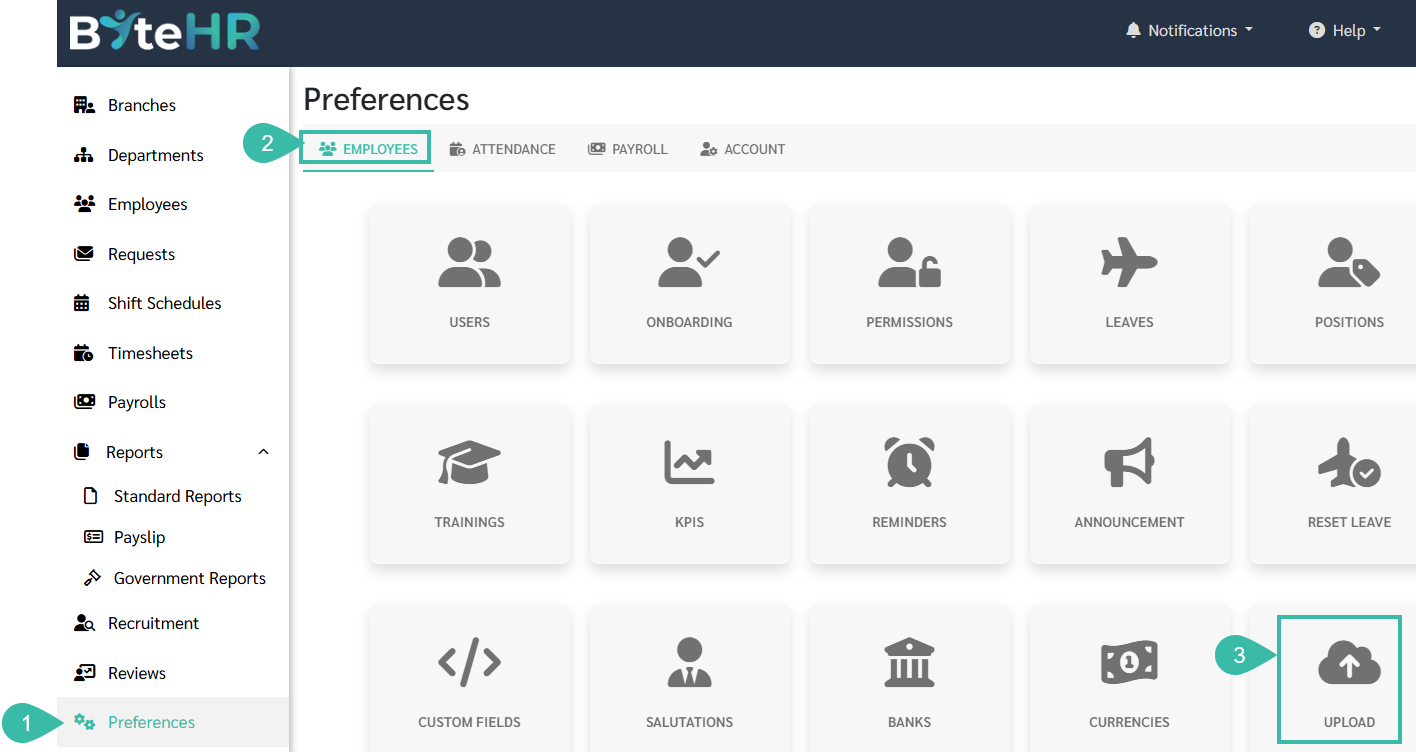
- Go to Preferences tab.
- Select Employees.
-
Click Upload.
-
Go to Upload Employees Tax Deduction.
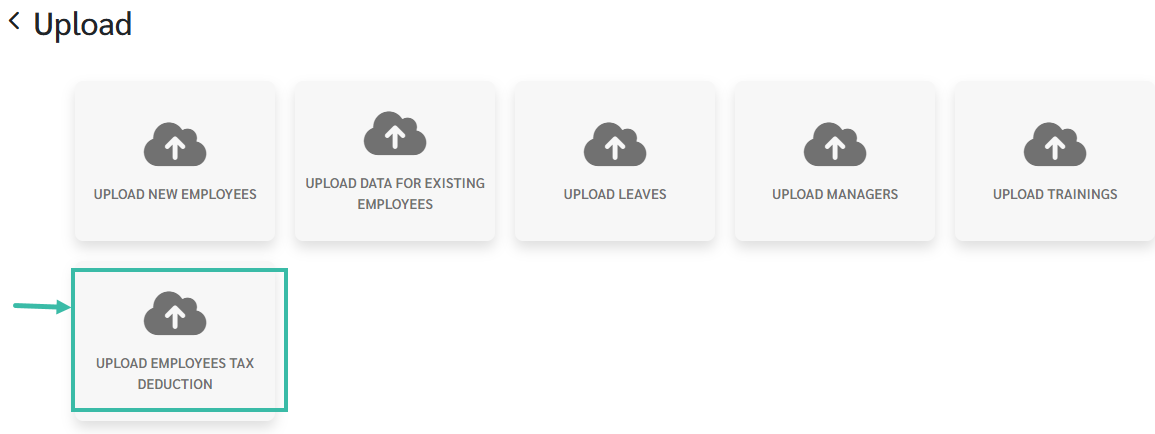
- Upload Employees Tax Deduction page will be displayed.
-
Click on the Template to download the template.

-
Once completed, return to the Upload Employees Tax Deduction page. Select the company for which you wish to upload the tax deduction, and click Next.
-
Select the file to upload.
- Map the fields accordingly.
-
Click Upload.
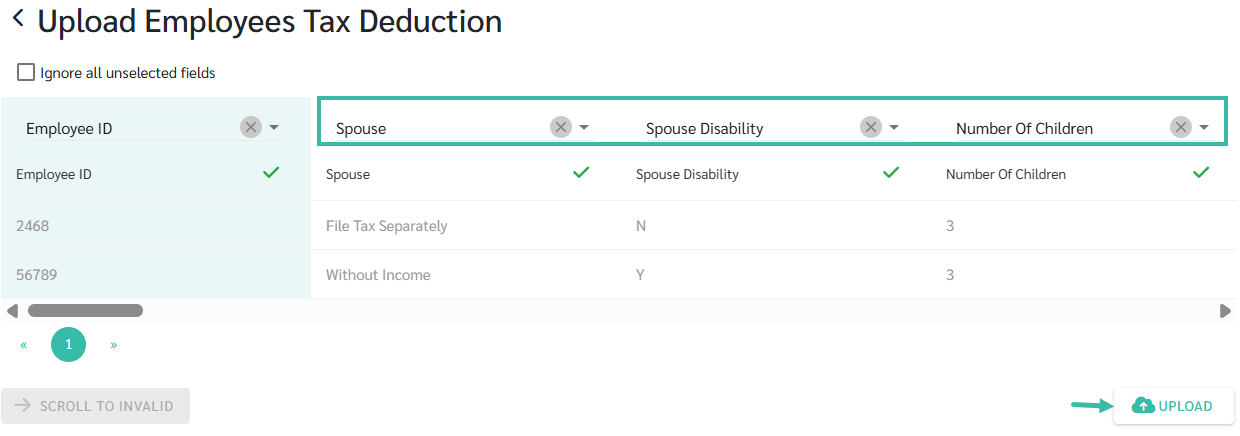
Fields in the Upload Tax Deduction Template
-
Employee ID
You can enter either the Employee ID or the System ID. Make sure to map the fields accordingly when uploading the file. For example, if you enter an Employee ID, select the "Employee ID" from the dropdown list, and if you enter a System ID, select the "System ID" from the dropdown list.
-
Spouse
If the employee's marital status in the employment contract is Single, Widowed, Divorced, or Separated, but in the template spouse's status filled as "File Tax Separately" or "Without Income," the system will not be able to upload the data.
-
File Tax Separately
When the Marital Status is Married, and Spouse is working, you may select File Tax Separately.
-
Without Income
When the Marital Status is Married and Spouse is not working, you may select Without Income.
-
- Spouse Disability:
- No: If the Spouse has no disability, you may enter "N" in the Upload file.
- Yes: If the Spouse is disabled, you may enter "Y" in the Upload File.
-
Number of Children:
You may enter the number of children in your care for tax purposes in this field.
-
For example: Married and spouse is working, total number of children are 5.
File tax separately, 3 children is under spouse care for tax purposes, and 2 under you. Hence in this field enter '2".
-
- Age of the Children
- Below 18 years
- A deduction of RM 2,000 per child.
- If your child is below 18 years, you don't need to enter a number in any of the below category.
- Above 18 (Full-time Education)
- A deduction of RM 2,000 per child if the child is unmarried.
- If your children is receiving full-time education including Matriculation, Pre-Degree, or A-level courses at a University, College, or Other Educational Institutes similar to it in Malaysia, they fall in this category.
- Above 18 (Higher Education)
- A deduction of RM 8,000 if the child at any time in the basis year is unmarried
- If your child is receiving full-time instruction (excluding Matriculation courses /Pre-Degree /A-Level) at a university, college or other similar educational establishment in Malaysia; or
- Receiving full time instruction outside Malaysia in respect of a Degree (including a Degree at Master or Doctorate level) or the equivalent of a Degree.
- Disabled (not in Higher Education)
- A deduction of RM 8,000.
- Disabled child who is unmarried falls in this category.
- Disabled (Higher Education)
- An additional deduction of RM 8,000 is allowed. An individual is entitled to a child relief of RM 16,000 if the below conditions are complied with.
- Child receiving full-time instruction (excluding Matriculation course/ Pre-Degree /A-Level) at a university, college or other similar educational establishment in Malaysia; or
- Child receiving full-time instruction outside Malaysia in respect of a Degree (including a Degree at Master or Doctorate level) or the equivalent of a Degree.
- Below 18 years
- Expenditure for parents/grandparents:
- Medical treatment, special needs, and caregiving services (parents)
- Dental treatment (parents)
- Full medical check-up (parents)
- Limited to RM 1,000 per year
- Includes the cost of vaccinations.
- Basic support equipment (self / dependents): with disabilities.
- Limited to RM 6,000 per year.
- Study fees (Oneself)
- Education fees (self): Diploma / Degree level
- Education fees (self): Master's or Doctorate level
- Education fees (self): Skills enhancement courses
- Limited to RM 2,000 per year.
- Medical Expenses
- Medical expenses for serious illness (self / spouse / child)
- Fertility treatment (self / spouse)
- Vaccination (self / spouse / child)
- Limited to RM 1,000 per year.
- Dental treatment (self / spouse / child)
- Limited to RM 1,000 per year.
- Full medical check-up (self / spouse / child)
- Limited to RM 1,000 per year.
- This includes COVID-19 screening tests including the purchase of self-test kits, mental health check-ups or consultations, disease confirmation fees, and the purchase of health examination equipment for oneself/ spouse / child
- Assessment for children with learning disabilities aged 18 and below
- Limited to RM 6,000 per year.
- Lifestyle Expenses for personal use /Spouse /Child
- Purchase or subscription of books, journals, magazines, newspapers, or other similar publications (self / spouse / child)
-
Purchase of personal computers, smartphones, or tablets (self / spouse / child)
Ensure this is not for business use.
-
Monthly internet subscription (self / spouse / child)
Under your own name.
- Skills improvement or personal development courses (self / spouse / child)
- Lifestyle-Additional Allowances for the use/benefit of self/spouse/child/parents:
- Purchase of sports equipment (self / spouse / child / parents)
- According to the Sports Development Act 1997
- Rental or entry fee for sports facilities (self / spouse / child / parents)
- Registration fee to participate in sports competitions (self / spouse / child / parents)
- Organized by approved and licensed organizers under the Sports Development Act 1997
- Gym membership or sports training fees (self / spouse / child / parents)
- Purchase of sports equipment (self / spouse / child / parents)
- Purchase of breastfeeding equipment
- Limited to RM 1,000 per year.
- Fees for childcare centers or kindergarten
- Limited to RM 3,000 per year.
- Fees for sending children aged 6 years and below to registered childcare centers / kindergarten
- Net savings in National Education Savings Scheme (SSPN)
- Limited to RM 8,000 per year.
- Alimony to ex-wife
- Limited to RM 4,000 per year.
- Life insurance premium
- Private Retirement Scheme (PRS) and deferred annuity
- Limited to RM 3,000 per year.
- Education and medical insurance premium
- Limited to RM 4,000 per year.
- EV charging facilities
- Limited to RM 2,500 per year.
- Expenses for installation/rental/purchase including hire-purchase of subscription equipment for the use of electric vehicle charging facilities for personal vehicle (not for business use) / Purchase of food waste composting machine for household use
- Interest payment on the first home loan
- First home loan interest (house ≤ RM500,000)
- Limited to RM 7,000 per year.
- First home loan interest (RM500,001–750,000)
- Limited to RM 5,000 per year.
- First home loan interest (house ≤ RM500,000)
- Rebate
- Zakat (Paid Direct By Employee)
- Departure Levy/Religious Travel
Note
- If you add a new deduction item that is not already in the employment contract, after uploading the tax deductions, this new deduction item will be added to the employee's employment contract.
- If the employment contract already includes existing deductions and a new deduction is uploaded, the system will replace the value of the old deduction with the new deduction.
- If the template contains deduction items but no value is entered, the system will skip that deduction item.
- If the deduction value entered in the template is 0 or 0.00, the system will either replace the deduction value in the employment contract (if any) or add this deduction to the employment contract as RM 0.