
Fixed Tax Rate
- Fixed Tax Rate can be applied for employees whose Monthly Tax Deduction (MTD) is based on a Fixed Percentage.
- Fixed Tax Rate can be applied for employees under the following categories:
- Returning Expert Program (REP)
- Knowledge Worker
- Resident (Non-Citizen) holding C-Suite position
- Any employee whose MTD is based on Fixed Tax Rate (e.g. 15%).
How to Configure Fixed Tax Rate in the System
- Navigate to the Company/Branch tab.
- Select the relevant Company/Branch.
- Click on Payroll Settings.
- Enable the Fixed Tax Rate option and enter the rate. Ex: 15%
- The system computes Fixed Tax:
- Calculate the Assessable Income.
- Apply the Fixed Tax Rate.
- Deduct the Accumulated Tax Paid (MTD) from previous months.
- Finally, multiply with remaining months.
- Example:
-
Pay Period: February
Marital Status: Single
Basic Salary: RM 6,500*12 = RM 78,000
Deductions
EPF Contribution: RM 715
EPF Contribution Estimate: RM 2,570
PERKESO (SOCSO +EIS): RM 41.65
Individual Tax Relief: RM 9,000
Accumulated MTD of Previous Month: RM 811.98
-
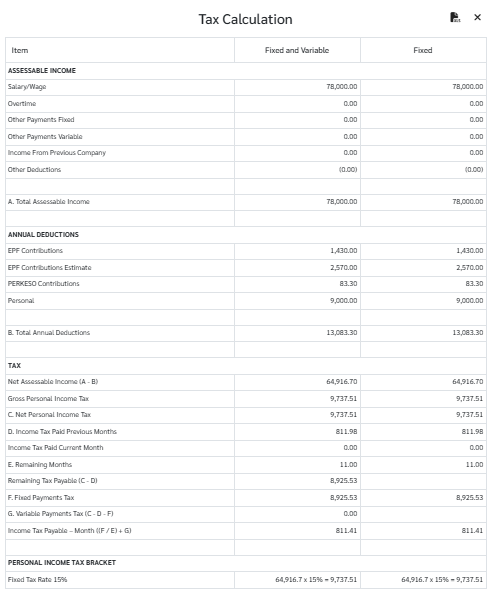
Net Assessable Income:
RM 78,000 - (RM 715*2) - RM 2,570 - (RM 41.65*2) - RM 9,000 = RM 64,916.70
-
Personal Income Tax Bracket
RM 64,916.70 * 15% = RM 9,737.51
-
Income Tax Payable:
(RM 9,737.52 - RM 811.98) * 11 = RM 811.41
-
You may view the Monthly Tax Report (CP 39) (Reports -> Government Reports -> Monthly Reports -> CP39

-
-
